
We Ship Our UI Through a Subtitle System
We ship our UI through an in-game subtitle system.
Upon trying to describe this system to some friends, they thought it must have been some kind of practical joke. However, it is a literal description of the system we have now shipped.
Deadworks is the server-side modding framework for Deadlock, the latest online multiplayer game from Valve (creators of Steam, Counter-Strike, Half-Life and Dota 2). The closest comparison for Deadworks is probably SourceMod, the popular modding framework for Source 1 games.
Deadworks is an SDK through which server operators can write plugins in C#, run custom servers, alter game behaviour and build entirely new game modes. Deadlock runs on Source 2, so the existing Source 1 modding ecosystem, which is rich and mature, can't simply be carried across. We have had to rebuild much of that specifically for Deadlock.
Until recently, one of the most significant omissions was any sort of custom UI within the game.
Without it, almost every interaction had to pass through chat commands. Players typed !vote, !help and similar commands, usually followed by more text or a number. Some plugin authors found innovative alternatives. Some placed models in the world and treated damaging them as physical menu options. Civo's server went further, putting speed and a timer above each player's head with CPointWorldText.
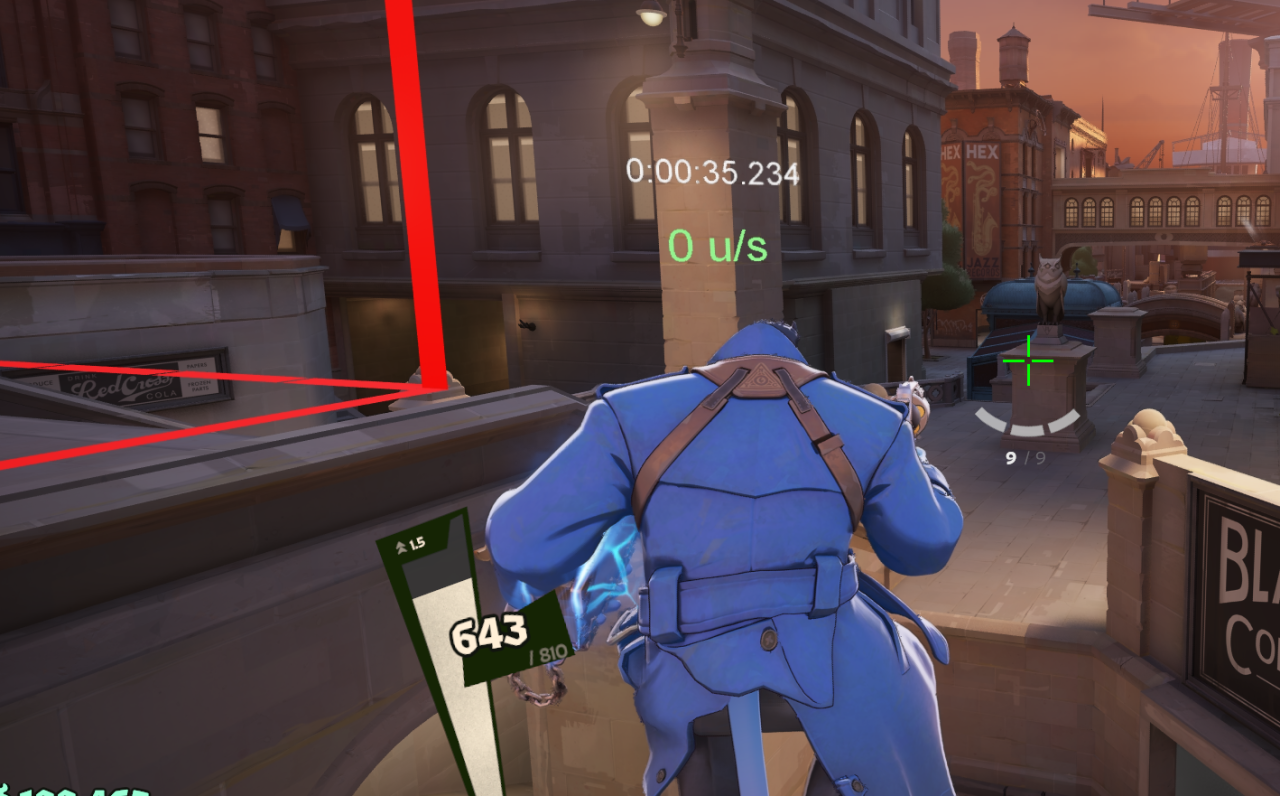
Those solutions are clever, but they are not a substitute for an interface. A game mode eventually needs menus, timers, scoreboards, prompts, buttons and information that can be updated without asking the player to enter another chat command.
Deadlock ships with Valve's Panorama UI system, which allows the game's developers to ship a rich UI written in XML/CSS/JS. It would be familiar to a web developer, but it is not built on web standards. Our ultimate goal is to give developers control over custom Panorama UI elements that are server-driven.
// Examples from the Panorama documentation.

// Find a panel by ID and change its text
$( "#MyLabel" ).text = "hello";

// Create a new panel and load a layout into it
var parentPanel = $.GetContextPanel(); // the root panel of the current XML context
var newChildPanel = $.CreatePanel( "Panel", parentPanel, "ChildPanelID" );
newChildPanel.BLoadLayout( "file://{resources}/layout/new_panel.xml", false, false );
The $ object is Valve's panel API: finding panels, creating them and logging all go through it.
<!-- A layout: panels declared in XML -->
<root>
    <Panel class="root_panel">
        <Label id="HealthLabel" text="0" />
    </Panel>
</root>
Most fields, though, are set from Valve's C++ code rather than from JavaScript. Panorama scripts are not usually the thing writing a health value; the script or an XML layout makes a panel with an ID and leaves it to the developers on the C++ side to set that HP each frame. The API surface is extremely limited too: really just creating and deleting panels and setting values on them, with very little other access to the game.
To give a sense of what is possible with Panorama: Wormy has already built a Minecraft UI with the Deadworks UI mods, crafting grid, inventory and all.
fully working Minecraft UI in #deadlock
— wormy (@jetsetworm) August 13, 2026
huge thanks to jonas12294 on discord for writing the UI bridge into the deadworks framework😁 pic.twitter.com/KszGFTr8hF
Minecraft Crafting Table fully working in #deadlock pic.twitter.com/hDXhl76ote
— wormy (@jetsetworm) August 15, 2026
The client-side boundary
We've been thinking about this problem since we started Deadworks six months ago. From the beginning, one of our core principles has been: heavily modded servers, unmodified clients.
On the server, we mean that literally: we essentially run an extremely heavily modified Deadlock server. Deadworks itself is a C++ mod that hooks many of the Source 2 engine internals, with the C# SDK built on top.
We're happy to extend Deadlock's client as far as Source 2's content addon system will allow us. What we don't want to do is cross the line into modifying the running game client itself, through DLL injection. At that point what we are doing would start to overlap with the techniques used by cheats, and would carry a very real risk of VAC bans (if VAC is enabled for Deadlock, which it currently isn't).
A native client DLL would give us clean access to the client's internal systems and much greater control over Panorama. Jonas, the modder behind many of the wacky game mode features on the glutensnake YouTube channel, built a prototype of that approach in a fork, which started to gain some attention in the community and prompted us to find a shippable solution.
Jonas's fork included a DLL that needed to be injected into the game, and gave the Deadworks server a high-bandwidth, multi-directional communication system for modifying the UI.
For the reasons above, we decided this couldn't go out with the production release of Deadworks, and that what we needed to do was find four things:
- A bootstrap: a script of our own running inside Panorama on every client, installed as an ordinary content addon by the launcher rather than as injected code
- A downstream channel: a way for the Deadworks server to deliver arbitrary data to an individual client that the bootstrap could read
- A dynamic UI layer: Panorama APIs the bootstrap could use to construct and update interfaces at runtime, rather than only loading layouts compiled into the game
- An upstream channel: a way for Panorama to send events and data back to the Deadworks server, attributable to the player who triggered them
The rest of this post works through those four problems in order.
A small Panorama bootstrap
The Deadworks launcher places a small content addon on the client before the game starts, containing a bootstrap script called dw_bootstrap.js.
It is best understood as a small UI runtime or interpreter. It knows how to locate Deadworks messages, decode them and apply a limited set of operations to the live Panorama panel tree. It can create containers, labels, buttons and images; apply styles and change them on panels already built; update text; append or remove children; load layouts supplied through content addons; and destroy panels when they are no longer required.
The server does not send native code to the client. For the ordinary code-driven UI path, it sends a declarative description of what the interface should contain and a sequence of operations describing how that interface should change.
The launcher's original goal was to deliver maps and other content addons such as models. Deadlock currently has no Steam Workshop support, so custom servers with custom maps were simply impossible before we started distributing the launcher. Now it is also responsible for installing this UI bootstrap content addon.
Why subtitles?
We needed a path by which a modified server could send arbitrary text to one particular client without installing native code on that client.
Closed captions already provide one.
Deadworks can send a close-caption user message to an individual recipient. Deadlock receives that message through its normal caption pipeline and creates Panorama panels containing the resulting text. Our bootstrap is already running inside Panorama, so it can inspect those panels and read the text back out.
Our content addon modifies the Deadlock UI so that captions themselves are not shown to the player. The bootstrap keeps the subtitle container active but transparent, and listens for the event emitted when caption items change.
The path is unusual, but it is simple:
Deadworks server
    ↓
close-caption message
    ↓
Deadlock caption system
    ↓
Panorama subtitle label
    ↓
Deadworks bootstrap
    ↓
dynamic UI panel
A subtitle system is not a network protocol
The principal constraint with using the subtitle system is bandwidth. It is tempting to think of the caption message as a small socket through which we can send anything we want. It is not, and exceeding its limits does not always produce a useful error.
The caption system exposes only six caption items to Panorama at one time, and each occupies its slot for the caption's duration plus its linger time. A seventh concurrent caption is not queued for later; it is simply lost. Once the pool is full, sending more messages does not increase throughput, it increases the probability that a frame disappears before the bootstrap ever sees it. Real in-game captions compete for the same pool.
Frame size matters too. The client's caption-processing path copies text through a fixed-size buffer of roughly 4,000 characters, so that is the ceiling on a single frame. Between the pool recycling about twenty-one times a second and frames of that size, we budget 16 KB/s per player by default, and the pool itself would allow several times that.
These constraints rule out the naive implementation. We cannot resend an entire XML document or a full copy of the UI whenever one value changes. Even where the bytes might fit, the number of frames and their lifetime make that approach too expensive and too fragile.
We send operations, not documents
The central design decision was to treat the bootstrap as an interpreter for a small UI instruction set.
The server sends compact operations such as:
build       construct a new panel tree
set         update one or more named values
style       change style properties on nodes already built
clear       clear the panel's current state
raw         pass opaque text to a panel's own script
precache    decode and retain a panel tree
show        render a previously precached tree
append      add a subtree beneath an existing node
erase       remove an existing node
loadxml     load a layout already present in a content addon
destroy     remove the panel entirely
heartbeat   prove that the transport is still alive
A logical message begins with the panel ID, followed by an operation code and its payload:
panel_id <separator> operation <separator> payload
The bootstrap reads the operation and applies it directly to the current Panorama tree. Each operation maps onto a small set of panel APIs:
| Operation | Panorama APIs |
|---|---|
build, append | $.CreatePanel with the Panel, Label, Image and Button panel types; SetPanelEvent("onactivate", ...) for button clicks; SetImage for image sources |
style | camel-cased CSS-like properties written onto panel.style |
set | FindChildTraverse to locate the target, then assigning its text |
loadxml | BLoadLayout |
erase, destroy | DeleteAsync |
The important distinction is between structure and state. Structure is expensive but changes infrequently; state is small and changes constantly. A scoreboard is constructed once with build, and from then on updating a timer from 10 to 9 requires only the panel ID, the field name and the new value.
Compressing a panel tree
4,000 characters per subtitle is not a lot to work with, so we needed a compression scheme. When a plugin builds a panel in C#, Deadworks first converts the tree into a compact field stream.
Each node is represented by eight fields: its type, ID, style, text or image source, click event, hover style, press style and number of children.
The field stream then goes through a set of compression steps. Step through them below to see what each one does:
A vote menu: a container, a title, and three buttons that each carry a map icon, a label and a hover style.
The return path
The upstream channel, the last of the four problems, turned out to be the simplest. It does not use subtitles. When the player clicks a button, the bootstrap issues a dw_ui console command containing the panel ID, event name and arguments. Deadworks receives that command on the server with the issuing player already identified by the connection, so a plugin never has to work out who pressed what.
Putting it all together
Server-driven UI turns out to be surprisingly capable. With this system it is straightforward to build interactive, multiplayer interfaces inside Deadlock. Here's an example of a tic-tac-toe game.
And this is what a server-driven panel looks like from the plugin side:
using DeadworksManaged.Api;
using DeadworksManaged.Api.UI;

public class RoundHud : DeadworksPluginBase {
    public override string Name => "RoundHud";

    static UINode Layout() => UI.Vertical()
        .WithStyle("horizontal-align", "center")
        .WithStyle("vertical-align", "top")
        .WithStyle("margin-top", "24px")
        .WithStyle("padding", "8px 14px")
        .WithStyle("background-color", "#0a0c08e6")
        .WithStyle("border", "1px solid #5FE69E55")
        .Add(
            UI.Label("timer", "0:00")
                .WithStyle("font-size", "20px")
                .WithStyle("color", "#FFEFD7"),
            UI.Label("score", "0 - 0")
                .WithStyle("font-size", "14px")
                .WithStyle("color", "#5FE69E"),
            UI.Button("hideButton", "Hide")
                .WithStyle("margin-top", "6px")
                .OnClick("hide")
        );

    public override void OnLoad(bool isReload) {
        UI.Panel("round").On("hide", e =>
            UI.Panel("round").DestroyLayout(e.Caller.Recipients));
    }

    public override void OnClientFullConnect(ClientFullConnectEvent args) {
        if (args.Controller is { } controller)
            UI.Panel("round").BuildLayout(controller.Recipients, Layout());
    }

    public void Update(RecipientFilter players, string timer, string score) {
        UI.Panel("round").Build()
            .Set("timer", timer)
            .Set("score", score)
            .SendTo(players);
    }
}
Special thanks to Jonas for the prototype version of this system.